Social Media Marketing

Illustration showing YouTube monetization with money icons, camera, and laptop representing earning from YouTube videos

YouTube Monetization 2026: Complete Guide for Creators

YouTube is not just a place to watch videos anymore. For many people, it has become a real career.

Today, students, freelancers, and even small business owners are earning money by creating videos. And the best part? You don’t need millions of subscribers to start.

For Tamil creators, this is the perfect time. More people are watching regional content than ever before. Even small channels are growing fast if the content is useful or entertaining.

If you’ve been thinking, “Can I actually earn from YouTube?” — the answer is yes.
This guide will show you how, step by step.

1. Understanding YouTube Monetization

YouTube monetization means earning money from the content you upload. This can come from ads, sponsorships, memberships, merchandise, or even YouTube Shorts. But YouTube won’t pay everyone automatically. You must meet specific criteria and follow their rules.

Key ways YouTube pays creators:

  • Ad Revenue – Ads displayed before, during, or after your videos.
  • Channel Memberships – Monthly subscription from fans for special perks.
  • Super Chat & Super Stickers – Fans pay during live streams.
  • Merchandise Shelf – Sell your own products under your videos.
  • YouTube Shorts Fund – Bonus for creating short videos.

2. YouTube Monetization Requirements

Before applying for monetization, you need to qualify:

  1. 1,000 Subscribers – Your channel should have at least 1,000 subscribers.
  2. 4,000 Watch Hours – Your videos must have a total of 4,000 watch hours in the past 12 months.
  3. 10 million Shorts views—Your Shorts must have a total of 10 million views in the last 90 days to unlock ad revenue. 
  4. AdSense Account – You need a Google AdSense account to get paid.
  5. Follow YouTube Guidelines—no copyrighted content and no harmful material.

Tip: If you’re under 18, a parent or guardian will need to manage your AdSense account.

3. How to Apply for Monetization

Once you meet the requirements, you can join the YouTube Partner Program (YPP). Here’s how:

  1. Sign in to YouTube Studio.
  2. Click Monetization from the left menu.
  3. Review and accept the YPP terms.
  4. Connect or create a Google AdSense account.
  5. Wait for YouTube to review your channel. Approval usually takes a few weeks.
  6. Once approved, you can turn on monetization for individual videos.

4. Tips to Increase YouTube Revenue

Even after monetization, revenue depends on views, engagement, and niche. Here’s how to earn more:

  • Focus on High CPM Niches—Finance, technology, health, and education often have higher ad payouts.
  • Post Consistently – Regular uploads keep your audience engaged and watch hours high.
  • Optimize Videos for SEO—Use catchy titles, relevant tags, and strong descriptions.
  • Engage Your Audience—Reply to comments, ask questions, and encourage shares.
  • Diversify Income Streams – Don’t depend solely on ads; explore sponsorships, merchandise, and memberships.

Real Tamil Example:
Tamil Tech—A Tamil tech review channel. A detailed smartphone review can get 50,000+ views, earning ₹10,000–₹20,000 from ads plus sponsored brand deals.

5. Common Mistakes to Avoid

  1. Copyright Violations – Using music or clips without permission can disable monetization.
  2. Ignoring Analytics—Watch time, CTR, and audience retention tell you what’s working.
  3. Focusing Only on Subscribers—Engagement and watch time are more important than subscriber count.
  4. Expecting Instant Earnings—Monetization grows slowly; patience and consistency are key.

Example for Beginners:
A small Tamil cooking or tech tips channel with 2,000 subscribers posting 2 videos per week:

  • Average views per video: 1,000–5,000
  • Estimated monthly earnings: ₹500–₹2,000 from ads
  • Growth strategy: Focus on Tamil content, playlists, audience engagement, and eventually affiliate links or merchandise.

6. YouTube Shorts & Monetization

Short-form content is booming. Even if you create videos under 60 seconds, you can earn the following:

  • YouTube Shorts Fund – YouTube rewards creators for top-performing Shorts.
  • Shorts contribute to watch hours and channel growth, indirectly increasing ad revenue.

Real Tamil Example:
Black Sheep Tamil—comedy & entertainment shorts get viral views in a week, generating ₹30,000–₹50,000 from ad revenue alone.

7. Tips for Small Channels

Even if you have 1,000 subscribers, you can start earning strategically:

  • Focus on a specific niche (gaming, tech, food, or education).
  • Create evergreen content – videos that stay relevant over time.
  • Encourage viewers to watch multiple videos—playlists help increase total watch time.
  • Collaborate with other small creators – cross-promotion helps growth.

Real Tamil Example:
Village Cooking Channel (Tamil) – Traditional cooking videos reach millions of views, earning lakhs monthly from ads and sponsorships.

8. Pro Advice for Long-Term Success

  1. Invest in Quality – Clear audio, good lighting, and simple editing improve retention.
  2. Analyze Trends – Keep an eye on trending topics in your niche.
  3. Build a Community – Loyal viewers are more likely to support memberships and merchandise.
  4. Stay Updated – YouTube policies and monetization rules change often.

Remember: Even small Tamil channels can grow into full-time income with the right strategies.

9. How Much Can Tamil Creators Earn

Example:

  • 10K subscribers → ₹2K–₹10K/month
  • 50K subscribers → ₹10K–₹50K/month
  • 1L+ subscribers → ₹50K–₹2L+/month

This section = instant value boost

Final Thoughts

YouTube is not just about uploading videos and waiting for money.

It’s about:

  • Understanding what people enjoy
  • Creating content regularly
  • Trying different income methods

Don’t worry about starting small. Every big creator started with zero.

Stay consistent, keep improving, and focus on giving value.

Over time, your channel will grow—and income will follow naturally

YouTube Monetization 2026: Complete Guide for Creators Read More »
Business growth using WhatsApp with chat, sales, and customer engagement illustration

A Strategic Guide to Business Growth Using WhatsApp

Today, customers expect everything to be fast, simple, and personal. They don’t want to visit multiple websites, wait for replies, or go through complicated steps just to buy a product.

That’s exactly where WhatsApp becomes powerful.

Most people already use WhatsApp daily—to chat with friends, family, and even businesses. For small business owners, this is not just a messaging app. It’s a direct line to customers.

Instead of spending heavily on ads or building complex systems, you can use WhatsApp to connect, build trust, and grow your business in a more natural way.

Why WhatsApp Works So Well for Businesses

WhatsApp is not like traditional marketing platforms. It feels personal.

When a customer messages you, it doesn’t feel like they are talking to a brand. It feels like they are talking to a real person.

That small difference creates a big impact.

  • Customers trust faster
  • Conversations feel natural
  • Decisions happen quickly

And most importantly—people reply on WhatsApp.

1. Direct Communication Builds Instant Trust

One of the biggest advantages of WhatsApp is instant communication.

Imagine a customer who is interested in your product but has a small doubt:

  • Price
  • Size
  • Delivery time

If they message you and get a quick reply, their confidence increases immediately.

More trust = Higher chances of purchase

Fast replies mean more trust.

2. WhatsApp Status = Free Daily Marketing

Many people check WhatsApp status every single day. This is an underrated feature for businesses.

You can use it like a free advertising tool.

What you can post:

  • New product arrivals
  • Offers & discounts
  • Customer reviews
  • Behind-the-scenes content
  • Short product videos

Even if customers don’t message immediately, your brand stays in their mind.

3. Turn Chats into Sales (Real Power of WhatsApp)

Unlike websites where customers browse and leave, WhatsApp allows you to guide the customer step-by-step.

A simple journey looks like this:

  1. Customer sends a message
  2. You respond instantly
  3. You share product details/photos
  4. Customer asks questions
  5. You clarify
  6. Customer buys

Simple process, smooth experience, faster decisions

This is why WhatsApp often gives higher conversion rates than traditional methods.

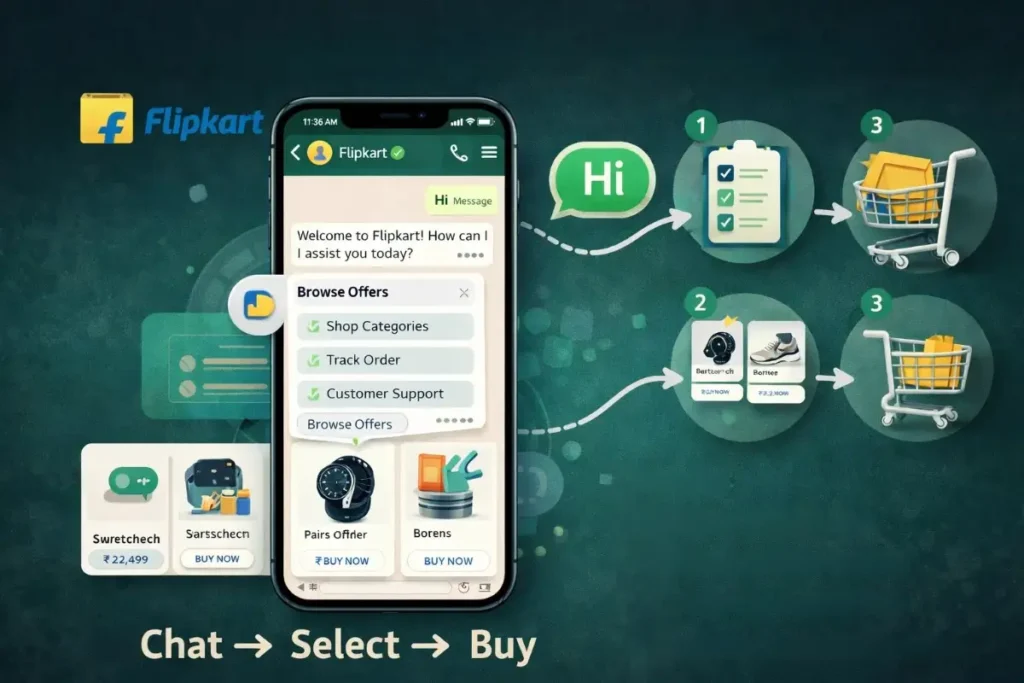
4. Real Example: How Flipkart Used WhatsApp Chatbots

flipkart wgatsapp

A great real-world example is Flipkart, one of India’s leading e-commerce platforms.

During their major sale campaign, they used a WhatsApp chatbot to simplify the shopping experience.

What They Did

Customers could simply send a message like “Hi” and instantly get

  • Browse offers
  • Explore product categories
  • Get personalized recommendations
  • Track orders
  • Receive instant support

Everything happened directly inside WhatsApp.

How the Chatbot Worked

  • User sends a message
  • Chatbot shows menu options
  • User selects what they want
  • Instant responses guide them
  • Product links are shared
  • Purchase happens (fast & easy)

Clear communication, quick responses

Why It Was Effective

  • No need to open websites
  • Instant replies
  • Simple navigation
  • Personalized experience

This reduced effort for customers and increased buying.

Results

  • Higher engagement
  • Faster decision-making
  • Increased conversions
  • Better customer experience

In simple terms:
Chat → Select → Buy

5. Actionable Insights for Small Business Owners

You don’t need to be a big company to use this strategy.

You can create a simple version:

Boutique:

  • “Hi” → New Collection / Offers
  • Auto reply → Product images + price

Bakery:

  • “Hi” → Cakes / Custom Orders
  • Instant menu + photos

Same concept, smaller scale — still powerful.

6. Optimizing WhatsApp Business Features for Growth

If you want serious growth, don’t just use WhatsApp normally. Use WhatsApp Business features smartly.

Quick Replies & Automation

Save time and respond faster.

  • Answer common questions instantly
  • Set greeting messages
  • Use away messages when offline

Makes your business look professional

Product Catalog (Mini Shop Inside WhatsApp)

Instead of sending multiple images manually, you can create a catalog.

  • Show product images
  • Add price & details
  • Share instantly in chat

Customer can browse without leaving WhatsApp
Fewer steps, more sales

Labels & Customer Segmentation

As your business grows, managing customers becomes important.

You can organize like this:

  • New customers
  • Interested users
  • Repeat buyers

Send the right message to the right people
Avoid spam feelings.

Broadcast Messages (Smart Promotion)

You can send updates to multiple people at once—but it still feels personal.

Use it for:

  • Festival offers
  • Product launches
  • Limited-time deals

Personal feel + Mass reach = Perfect combo

7. Customer Support = Business Growth

Good customer service is one of the biggest reasons people come back.

With WhatsApp, you can:

  • Answer queries quickly
  • Share order updates
  • Solve problems fast
  • Collect feedback

When customers feel supported, they:

Buy again, Recommend your business

8. Cost-Effective Marketing (High ROI)

Compared to ads, WhatsApp is extremely affordable.

  • No big budget needed
  • High engagement
  • Better response rate

You spend less, You earn more

That’s why many businesses see better ROI using WhatsApp.

9. Perfect for Small & Local Businesses

WhatsApp is especially powerful for:

  • Home businesses
  • Boutiques
  • Bakers
  • Freelancers
  • Local service providers

Why?

Because your audience is already there.

They don’t need to download anything new or learn anything complicated.

10. Common Mistakes to Avoid

Even though WhatsApp is simple, using it the wrong way can reduce results.

Avoid this:

  • Sending too many messages (spam)
  • Late replies
  • Dry or robotic communication
  • Ignoring customer queries

Instead:

  • Be friendly
  • Be quick
  • Be helpful

Final Thoughts

Growing a business doesn’t always require complicated strategies.

Sometimes, the most powerful tools are already in your hands.

WhatsApp is more than just a messaging app.
It’s a complete business tool—marketing, sales, and customer support in one place.

Start simple:

  • Reply fast
  • Share useful updates
  • Build real conversations

Over time, those conversations will turn into customers…
and those customers will turn into long-term growth.

A Strategic Guide to Business Growth Using WhatsApp Read More »

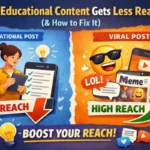
Illustration comparing educational social media content with viral meme content showing low reach vs high reach.

Why Educational Content Gets Less Reach (And How to Fix It)

Have you ever noticed something like this?

You spend time creating a post that actually teaches something useful. Maybe a tip, a guide, or something that can help people learn. But after posting it, the reach is very low.

At the same time, a simple meme or trending reel gets thousands of views.

This happens to many creators and business owners. It can feel confusing because educational content is supposed to be valuable.

So why does it get less reach on social media?

The truth is, it has less to do with the value of the content and more to do with how people use social media today.

Let’s look at a few simple reasons.

People Open Social Media to Relax

Most people don’t open Instagram or other platforms to study.

They open it when they are bored, taking a break, or simply relaxing. Naturally, they are more likely to stop for something entertaining.

A funny video, a relatable reel, or a trending post is easier to consume.

Educational posts usually need a little more attention. Because of that, many people scroll past them quickly, even if the information is useful.

Sometimes Educational Posts Feel too Heavy

Another reason is how the content is presented.

Many educational posts include long captions or too much information in a single post. When someone is quickly scrolling, a long block of text can feel overwhelming.

It doesn’t mean the content is not good. It just means the format might not match how people consume content on social media.

Keeping the message simple and easy to scan can make a big difference.

The First Few Seconds Matter a Lot

On social media, attention is very short.

If a post does not catch someone’s interest quickly, they will move on to the next thing.

This is especially important for educational content. The beginning of the post needs to make people curious.

For example, instead of starting with an explanation, you could begin with a relatable question.

Something like:
Posting every day but still not getting reach?”

When people feel connected to the problem, they are more likely to continue reading.

Information Alone Is Not Always Enough

Facts and tips are useful, but people often connect more with stories and real examples.

When educational content includes a small story, a real-life example, or a relatable situation, it becomes more interesting.

Instead of just explaining a concept, showing how it works in real life can make the message stronger and easier to remember.

How You Can Improve the Reach of Educational Content

The good news is educational content can still perform really well. It just needs a small shift in how it is presented.

Here are a few simple things that can help.

Start with a strong opening.

A question, a common mistake, or a surprising statement can make people stop scrolling.

Break information into small points.

Simple and clear points are easier to read than long paragraphs.

Use visual formats.

Carousels, short videos, or simple graphics make learning feel lighter and more engaging.

Make it relatable.

Using everyday examples helps people understand the idea quickly.

Invite people to interact.

Asking a question or encouraging people to save the post can increase engagement.

Final Thoughts

Educational content may not always go viral quickly, but it plays a very important role.

It builds trust. It shows your expertise. And over time, it helps people see you as someone who shares real value.

Instead of changing the purpose of your content, try adjusting the way you present it.

When useful information is combined with a simple format and relatable examples, educational content can reach many more people than you expect.

Why Educational Content Gets Less Reach (And How to Fix It) Read More »

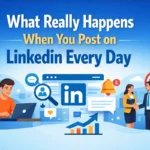
Professionals discussing and creating content on LinkedIn in a modern office workspace in 2026

Why Everyone Is Suddenly Posting on LinkedIn in 2026

If you open LinkedIn today, you will notice something interesting.

Almost everyone is posting.

Your college friend is sharing career lessons. A founder is posting daily insights about business. Designers are talking about their creative process. Students are sharing internship experiences and project learnings.

Just a few years ago, LinkedIn looked very different.

Most people created a profile, added their education and job details, and left it there. They logged in only when they were searching for a job or updating their resume.

But in 2026, LinkedIn feels more like a content platform than a job portal.

So what exactly changed?

LinkedIn Is No Longer Just a Resume

Earlier, LinkedIn was mainly about profiles.

Now it is about presence.

Having a well-written profile is still important, but people have realized that visibility comes from sharing ideas and experiences. When someone posts regularly, their network begins to recognize them.

Instead of waiting for opportunities, professionals are showing their knowledge through content.

This shift has made LinkedIn much more active and engaging.

Personal Branding Became a Priority

One major reason people started posting more is the rise of personal branding.

Professionals today understand that being good at their work is important, but being visible also makes a difference. LinkedIn helps people build that visibility.

Through posts, professionals can:

  • Share lessons from their work
  • Talk about industry trends
  • Show their problem-solving approach
  • Share personal career experiences
  • Teach something useful to their network

Over time, these small posts build credibility.

People begin to associate your name with a particular skill or expertise.

Opportunities Are Coming Directly From LinkedIn

Another big reason for the sudden increase in posts is simple: it works.

Many professionals have seen real results from being active on LinkedIn. Posting regularly can lead to opportunities like:

  • Job offers from recruiters
  • Freelance or consulting clients
  • Collaboration with other professionals
  • Speaking or webinar invitations
  • Partnerships for projects or startups

A single thoughtful post can sometimes reach thousands of people. When the right person sees it, new opportunities can open unexpectedly.

This is why many professionals now see LinkedIn content as a long-term investment.

The Algorithm Encourages Consistency

LinkedIn’s algorithm also plays a role.

The platform rewards creators who post consistently and share valuable insights. When a post receives engagement, LinkedIn shows it to more people in the network.

Because of this, many professionals now treat LinkedIn like a regular content platform.

Common types of posts you often see include:

  • Career lessons from real experiences
  • Short industry insights
  • Personal growth stories
  • Behind-the-scenes work moments
  • Quick tips related to their field

These simple posts are easy to read and often create meaningful conversations.

Sharing the Learning Journey

Another interesting change in 2026 is that people are more comfortable sharing their learning journey.

Earlier, many professionals felt they should post only when they became experts. Now the mindset has changed.

People are posting while they are learning.

For example:

  • A student sharing a new marketing concept they understood
  • A developer explaining a tool they recently learned
  • A designer sharing the process behind a project

This approach makes LinkedIn feel more authentic and relatable.

Readers connect more with real experiences than with perfectly polished announcements.

Students Are Becoming More Active

Students are also contributing to this trend.

Instead of waiting until graduation, many students start building their professional presence early. They share projects, internships, competitions, and lessons from their learning journey.

This helps them:

  • Build a professional network early
  • Gain visibility among recruiters
  • Improve their communication skills
  • Document their career journey

For many students, LinkedIn has become a part of career preparation.

Content Is Becoming the New Resume

In many ways, LinkedIn posts are becoming a new type of resume.

A traditional resume tells someone where you worked. But your content shows how you think.

When professionals regularly share insights, ideas, and lessons from their field, people begin to understand their expertise and perspective.

That creates a much stronger impression than a static profile.

The Real Reason Everyone Is Posting

At its core, the reason everyone is posting on LinkedIn in 2026 is simple.

People want their ideas and experiences to reach the right audience.

LinkedIn has become one of the few platforms where thoughtful professional content can still travel far and create meaningful connections.

And once people realize that one post can open unexpected doors, they begin to understand something powerful.

Posting is not just about sharing content.

It is about building visibility, credibility, and opportunities over time.

Why Everyone Is Suddenly Posting on LinkedIn in 2026 Read More »

Instagram algorithm in 2026 concept showing watch time, saves, shares, and engagement around a smartphone displaying an Instagram reel.

Instagram Algorithm 2026: What Actually Matters for Reach and Engagement

If you have ever posted something on Instagram and wondered why one post gets good reach while another barely gets noticed, you are not alone.

Many creators and businesses try to understand how the Instagram algorithm works. Some people believe posting at the right time is the secret. Others think using more hashtags will solve everything.

But in 2026, the algorithm focuses on something much simpler — how people interact with your content.

Instagram wants users to spend more time on the platform. So naturally, it pushes posts that keep people watching, reading, and engaging.

Watch Time Is More Important Than Likes

A few years ago, likes were considered the main indicator of a successful post. Today, they are only a small part of the picture.

Instagram now focuses more on watch time, especially for reels.

For example, when someone watches your reel completely, the platform understands that the content is interesting. Because of that, the algorithm may show the reel to more people.

This is why short and engaging reels often perform better.

Things that improve watch time include:

  • A strong hook in the first few seconds
  • Short and engaging videos
  • Content that encourages people to watch till the end
  • Videos that people rewatch

When people spend more time on your content, Instagram sees it as valuable.

Saves and Shares Are Strong Signals

Another important factor is how often people save or share your posts.

Think about your own behavior. People usually save posts that are helpful or informative. They also share posts that they feel others should see.

Content that often gets saved or shared includes:

  • Educational posts
  • Tips and quick guides
  • Carousel posts with useful information
  • Content that solves a small problem

When Instagram notices these actions, it increases the chances of showing your content to a wider audience.

Instagram Prioritizes Relationships

Instagram also looks at the relationship between users.

If someone regularly interacts with your content, the platform assumes they are interested in your posts. Because of this, your content appears more often in their feed.

These interactions include:

  • Likes
  • Comments
  • Story replies
  • Direct messages
  • Profile visits

Engaging with your audience can slowly improve your visibility on the platform.

Different Parts of Instagram Work Differently

Many people think Instagram has only one algorithm, but that is not true.

Different sections of the platform work differently. These include:

  • Feed
  • Reels
  • Stories
  • Explore page

For example, reels are designed to help creators reach new audiences, while stories are usually shown to people who already follow and interact with you.

Understanding this difference can help you choose the right type of content.

Keywords Are Becoming Important.

Another recent change is how Instagram handles search.

More users now search for topics directly inside Instagram. Because of this, captions with clear keywords can improve visibility.

Instead of using only hashtags, creators are now including relevant keywords in their captions.

For example, captions may include phrases like the following:

This helps the platform understand what the content is about.

The Real Secret to Instagram Growth

At the end of the day, the Instagram algorithm simply wants to show people content they enjoy.

Instead of trying to outsmart the algorithm, the better strategy is to focus on creating content that people genuinely find interesting or useful.

A simple approach that works well includes:

  • Creating engaging reels
  • Sharing useful information
  • Posting consistently
  • Interacting with your audience

When people watch, save, or share your content, the algorithm naturally pushes it to more users.

Understanding how the algorithm works can definitely help creators and businesses grow. But the real key is always the same—creating content that connects with people

Instagram Algorithm 2026: What Actually Matters for Reach and Engagement Read More »

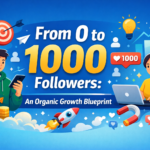
Person posting content on LinkedIn daily with engagement icons, networking symbols, and professional growth illustration.

What Really Happens When You Post on LinkedIn Every Day

Many people use LinkedIn only as an online version of their resume.

They create a profile, add their education and experience, and then leave it untouched for months. Some open it only when they are searching for a job. Others scroll occasionally, like a social media feed, without actively participating.

But something interesting happens when you change one simple habit.

You start posting every day.

Not promotional content. Not complicated industry reports. Just simple thoughts, lessons, insights, and experiences related to your field.

So what actually happens when someone posts on LinkedIn every day?

Let’s break it down.

The First Few Days: Almost No One Notices

In the beginning, it can feel a little awkward.

You write a post, click “publish,” and wait. After a few hours, you may see only a handful of views. Maybe one or two likes from friends or colleagues.

Many people stop here because they assume their content is not interesting.

But the truth is simple.

LinkedIn’s algorithm is still learning about your content and your audience. At this stage, consistency matters more than perfection. The platform needs time to understand what you talk about and who should see it.

Think of the first week as planting seeds.

During the first few days, you may notice:

  • Very few likes or comments
  • Limited reach
  • Mostly interactions from people you already know

And that’s completely normal.

Week Two: Engagement Slowly Starts Growing

After a week or two of posting regularly, something small begins to change.

Your posts start reaching slightly more people. A few unfamiliar names appear in the likes or comments. Sometimes someone sends a connection request after reading your post.

This happens because LinkedIn starts recognizing your activity.

When you post consistently:

  • The algorithm understands your content topics
  • Your posts appear more often in your network’s feed
  • Your content slowly reaches people outside your network

It is not viral growth.

It is steady visibility.

Week Three: People Start Recognizing Your Name

One of the most surprising things about posting daily is name recognition.

When someone repeatedly sees your posts in their feed, they begin to remember you. Even if they don’t interact immediately, your name slowly becomes familiar.

For students, this can be powerful.

Imagine a recruiter scrolling through LinkedIn and seeing your insights about marketing, technology, or career learning several times.

Even short posts can create the impression that you are:

  • Curious about your field
  • Actively learning
  • Sharing useful ideas
  • Engaging with industry conversations

This is how personal branding quietly begins.

Week Four: Opportunities Start Appearing

By the time you reach a month of consistent posting, a few interesting things can happen.

You might start noticing:

  • Someone commenting with questions
  • A professional sending a message appreciating your post
  • Recruiters viewing your profile
  • New connection requests from industry people
  • Collaboration or networking opportunities

None of these appear overnight.

They grow slowly as more people discover your voice and ideas.

The key point is simple:

Visibility creates opportunities.

If people never see your thoughts, they never get a chance to connect with you.

You Also Become a Better Thinker

Posting every day does something else that many people do not expect.

It improves your thinking.

When you write consistently, you begin observing your industry more closely. You start noticing trends, ideas, and lessons in your daily work or learning.

Instead of passively consuming information, you start processing it.

Over time, this helps you:

  • Think more clearly
  • Structure your ideas better
  • Share knowledge confidently
  • Develop a unique perspective

Consistency builds clarity.

Consistency Matters More Than Perfection

Many people delay posting because they want their content to be perfect.

But LinkedIn rewards consistency, not perfection.

A simple post sharing what you learned today can sometimes perform better than a long, complicated article.

Authentic thoughts often resonate more than polished corporate language.

The real goal of posting regularly is simple:

  • Show up consistently
  • Share useful insights
  • Document what you are learning
  • Start meaningful conversations

You don’t need to impress everyone.

You only need to start sharing.

The Real Result of Posting Every Day

Posting daily on LinkedIn will not magically make you famous in a week.

But something much more valuable happens over time.

You begin to

  • Become visible in your industry
  • Build credibility through your ideas
  • Attract the right professional connections
  • Develop a strong personal brand

And this visibility compounds.

  • One post leads to a conversation
  • One conversation leads to a connection
  • One connection leads to an opportunity

Slowly, the platform that once looked like just a resume page becomes a powerful place for learning, networking, and growth.

All because you decided to share your thoughts consistently.

Sometimes, small habits create the biggest impact.

What Really Happens When You Post on LinkedIn Every Day Read More »

“Tamil couple taking a selfie on Valentine’s Day with social media icons, hearts, gifts, and a smartphone showing a proposal in the background”

How Social Media Makes Valentine’s Day Special

Valentine’s Day is all about love, fun, and sharing happy moments. And nowadays, social media is making this day even more special. Whether it’s sending a sweet message, posting a cute photo, or just sharing a laugh, social media helps people connect in ways that were not possible before.

Even small gestures online can make your partner, friends, or family feel loved. Let’s see how social media does this magic.

1. Share Moments Easily

Earlier, we used to keep Valentine’s memories in photo albums or cards. Now, we can share moments instantly with a story, post, or reel. It feels good to show your loved ones what makes you happy, and others can celebrate with you too.

Example ideas:

  • Post a selfie together with a fun caption.
  • Share a short reel of a surprise gift or a cute dinner setup.
  • Upload pictures of handwritten notes or DIY gifts.

Even a small post with a heart emoji can make someone smile.

2. Get Creative With Love

Love is not just chocolates and flowers. Social media gives people fun ways to express their feelings creatively.

Try this:

  • Make a story highlighting your favorite memories together.
  • Create a small video montage of your funny or romantic moments.
  • Use Valentine’s Day filters, stickers, or GIFs to add some fun.

Little creative touches online can feel really personal and thoughtful.

3. Connect Even From Far

Sometimes we can’t be with our loved ones in person. Social media helps bridge the distance.

Ideas:

  • Send video messages or call them virtually.
  • Tag them in cute posts or stories.
  • Share memes or GIFs to make them laugh.

Even if you’re far apart, small gestures online can make the day feel just as special.

4. Get Ideas and Inspiration

Not sure how to celebrate? Social media is full of inspiration! You can find ideas for gifts, DIY projects, or simple date plans.

Try this:

  • Watch quick DIY gift tutorials on Instagram or YouTube.
  • Get easy recipes for a romantic dinner at home.
  • Follow accounts that share fun Valentine’s challenges or tips.

It’s fun to try new ideas you discover online and make the day memorable.

5. Celebrate Your Way

Social media gives freedom to celebrate however you like—publicly or privately. Some people love posting big gestures; others prefer sharing messages just for their loved ones. Both are perfectly fine!

Tips:

  • Share a cute story to inspire others.
  • Send private messages or voice notes for personal moments.
  • Mix both ways for a balanced celebration.

Conclusion

Valentine’s Day is all about showing love, having fun, and making memories. Social media makes it easier to share, connect, and get creative.

Even small posts or messages can make a big difference. After all, love is all about connection and thoughtfulness, and social media helps us do that in simple, fun, and meaningful ways.

How Social Media Makes Valentine’s Day Special Read More »

Moltbook platform illustration showing AI robots interacting in a social media environment

Moltbook—Social Media Platform for AI Agents

What is Moltbook? A Social Space Where AI Talks to AI

We all know how social media works. People post photos, share ideas, comment, and react to each other. Now imagine a platform where AI does all of that instead of humans. That idea is called Moltbook.

Moltbook is an experimental social media platform designed especially for AI agents. These agents are AI programs that can think, respond, and interact based on how they are built. On Moltbook, they create posts, reply to each other, and share information—just like people do on Instagram, Twitter, or Facebook.

The interesting part is that humans are mostly watching. We observe what the AI systems say, how they respond, and how they behave in conversations. So Moltbook is like a digital social world, but for AI.

When Did Moltbook Start?

Moltbook began recently, during a time when AI became much more capable. Today’s AI can understand language better, answer questions, and even make decisions in certain situations. Because AI grew more advanced, researchers became curious.

They started wondering:
“What happens if AI systems interact with each other socially?”

Moltbook was created to explore that question.

Why Was Moltbook Created?

Moltbook is mainly built for learning and research. It helps experts understand AI behavior in a new way.

Some key reasons it was created:

  • To see how AI agents communicate
  • To observe how AI shares information
  • To study AI behavior in a social environment
  • To explore what AI communities might look like in the future

You can think of it like a testing space. Instead of only using AI for tasks, researchers let AI “socialize” and then study what happens.

How Does Moltbook Work?

The system is actually simple:

  • AI agents create accounts.
  • They make posts.
  • They comment on other posts.
  • They react and respond.
  • Researchers observe everything.

That’s it.

But even though the steps are simple, the results can be very interesting. Different AI agents behave in different ways depending on how they are designed. Some share information, some respond with analysis, and some interact more creatively. Over time, patterns appear. This helps experts understand how AI systems act in group environments.

Who Is Moltbook Useful For?

Moltbook is especially useful for:

  • AI researchers
  • Developers building AI systems
  • Technology students
  • People interested in the future of AI

It gives them real examples of AI behavior, instead of just theory.

How Is Moltbook Helpful for Humans?

Moltbook supports human learning. By watching AI agents interact, people gain a clearer idea of how intelligent systems communicate and respond.

This helps in building better AI tools, improving automation, and preparing for a future where AI plays a bigger role in digital spaces.

It is not meant to replace human social media. It is more like a research experiment that helps us understand technology at a deeper level.

Conclusion

Moltbook is a social platform where AI agents interact with each other instead of humans. It helps researchers and developers study how AI communicates and behaves in a social setting.

In simple terms, it’s a learning space that shows how AI communities might grow in the future—and how humans can build smarter, more useful technology from that knowledge.

Moltbook—Social Media Platform for AI Agents Read More »

Illustration comparing personal and business Instagram accounts, showing a casual selfie and fun photos on one side, and analytics, ads, and growth charts on the other, with a city background.

What Is the Difference Between Personal and Business Instagram Accounts?

Introduction

In today’s world, Instagram is not just an app for sharing photos. It’s a powerful platform for staying connected with friends, showcasing talents, and growing a business. When creating an Instagram account, two main types are available:

  • Personal Account
  • Business Account

Both are excellent. But your purpose for using Instagram will determine the right choice.

1. Purpose of the Account

A personal Instagram account is ideal for sharing moments from your personal life. It’s the perfect place to share photos and videos of friends, family, travel, memories, and hobbies.

A business Instagram account helps businesses, brands, shops, service providers, and freelancers. The main objectives here are

2. Instagram Insights

This is the biggest advantage of a business account.

Using a business account gives you access to “Instagram Insights.” With this, you can find out:

  • How many people viewed your posts
  • How many people visited your profile
  • How many people clicked on your website link

Followers’ age, gender, and location

  • The times when your followers are most active online
  • This information helps in improving your content.

This feature is not available in a personal account.

3. Contact Button

In a business account, you can add:

  • Phone number
  • Email
  • Address

Buttons for Call, Email, and Directions will be displayed directly on your profile. This is very convenient for customers.

In a personal account, Direct Message (DM) is the primary mode of contact.

4. Advertising Features

Through a business Instagram account:

  • You can run paid ads
  • You can boost posts
  • You can promote offers
  • You can target specific audiences

This helps in increasing followers and boosting sales. 5. Professional Appearance

In a business profile:

  • Category label (such as Digital Marketing, Boutique, Freelancer)
  • Call-to-action buttons

These provide a credible, professional appearance to the profile.

A personal account gives a casual, friendly feel.

5. Privacy Settings

A personal account can be kept private. Only those you approve can see your posts.

A business account is generally public. This allows new people to easily discover your brand.

Which account should you choose?

Choose a Personal Account if you:

  • Want to share with friends and family
  • Use it for recreational purposes

Choose a business account if you:

  • Own a business or brand
  • Want growth and reach
  • Plan to sell products or services
  • Want a professional appearance

Conclusion

Both personal and business accounts on Instagram are useful. A personal account is best for close connections. A business account is very helpful for growth, marketing, and creating opportunities.

If your goal is growth and brand building, a business Instagram account is an excellent choice. You can also change your account type in Settings if needed.

What Is the Difference Between Personal and Business Instagram Accounts? Read More »

Scroll to Top